


MetaTrader 5 — Forex, Stocks
MetaQuotes Software Corp.
I approached MetaTrader 5 as a practical finance app rather than something to admire from a feature list. It is built for people who want to follow Forex and stock markets, study price charts, read market news, and place trades through a supported broker. My first impression was that it is much more capable than a casual quote-watching app, but that extra depth also creates the main challenge: the experience depends heavily on choosing the right broker connection and understanding the trading interface.
MetaQuotes Software Corp. has made this mobile version feel like a serious companion for an active trading account. It is free to install, carries an Everyone age rating, and supports devices running Android 6.0 or later. The app has been available since October 10, 2011, and its current version is 500.5856. Those details matter less than the workflow itself, but they show that this is an established tool rather than a newly released experiment.
The app is especially interesting if you already have a broker account or want one mobile place to monitor several markets. I would not recommend opening it casually and assuming the first screen will explain everything. A little preparation makes a large difference, particularly when a login fails, prices appear unavailable, or an order does not behave as expected.
Getting past the points where new users usually get stuck
The biggest source of confusion is that MetaTrader 5 is not, by itself, a bank account or a universal exchange account. The app connects you to a trading server associated with a broker. That means a correct username and password are not always enough. You may also need to select the exact server that belongs to your account. Choosing a similarly named server can make a valid login look broken.
I would begin by checking the account details supplied by the broker before troubleshooting the app. Look carefully at whether the account is a demo or live account, and make sure the login method matches the account type. A demo account and a live account can have similar-looking credentials while belonging to different servers. If the server selection is wrong, repeatedly entering the same password will not solve the problem.
Latest News

Uber Eats Under Pressure: What Happens When Delivery Goes Wrong

How QR & Barcode Scanner Adapts to Android and iOS Innovations

Why Waze Navigation & Live Traffic Is Your Essential Travel Companion

CapCut Mastery: Unleash Hidden Features for Pro-Level Editing

How OS Updates Enhance Roblox Adventures

Teacher Simulator: Exam Time Turns Quick Classroom Judgments into a Repetitive Loop
The first screen can also feel busier than expected. Quotes, charts, account information, and news are designed for quick access, but the layout assumes that the user already understands basic trading terms. I found it more comfortable to remove instruments I did not follow and keep only the markets relevant to my routine. A shorter watchlist reduces visual noise and makes it easier to notice a meaningful price movement.
Another common stumbling block is expecting every symbol to behave in the same way. A broker may offer Forex pairs, stocks, or other instruments with different trading hours, minimum order sizes, spreads, and permissions. If one instrument is unavailable while another works, that does not automatically indicate an app fault. The account and broker determine much of what appears and what can be traded.
Charts are powerful, but they reward deliberate setup. Instead of adding every indicator immediately, I would first choose a timeframe that matches the decision I am trying to make. A short-term chart can be useful for watching an entry, while a broader view may provide better context. Switching between them without a plan can encourage impulsive decisions, especially on a small phone screen.
Gallery
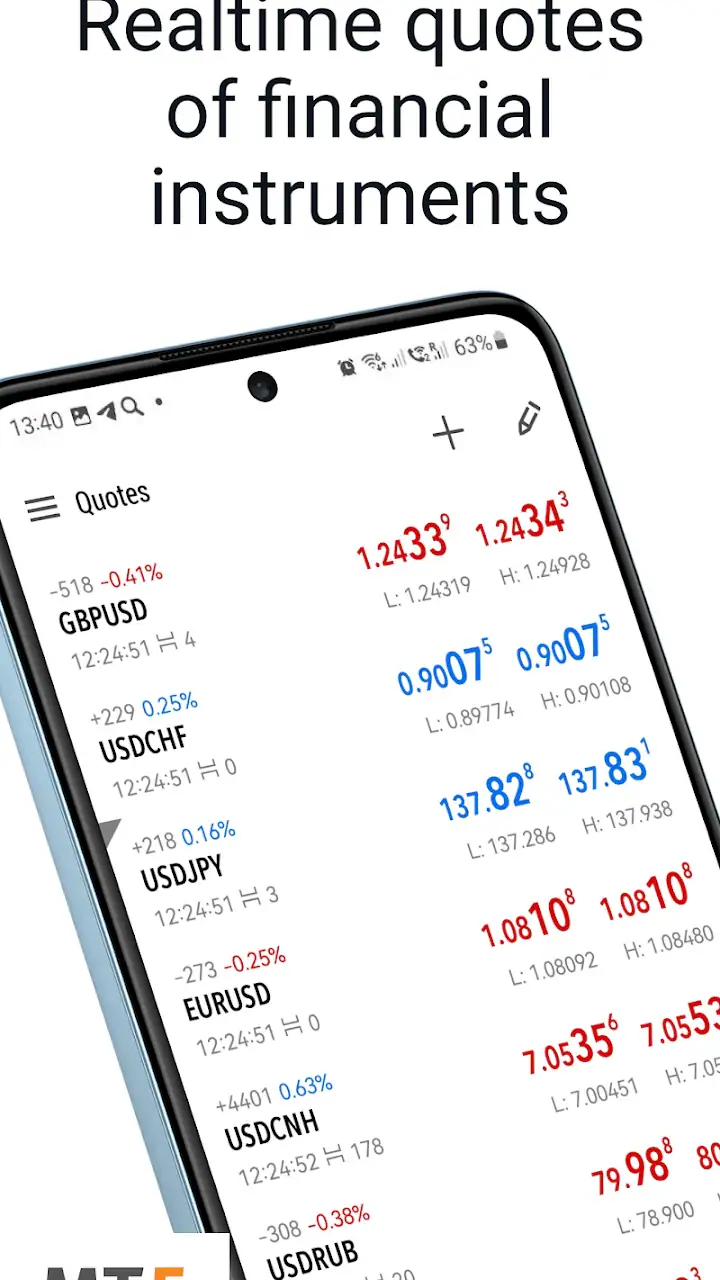
Notifications and price movements can also create a false sense of urgency. A changing quote is not the same as a completed trade, and seeing a market move does not mean an order will execute at the price currently displayed. I treat the quote screen as information, not as a promise. That distinction is important for anyone moving from a simple investing app where order handling may feel more guided.
For a first session, I would avoid placing a trade immediately. I would identify the account balance area, open a chart, inspect the symbol details, and learn where order confirmation appears. This short orientation helps answer a practical question: am I looking at a live account, a demo environment, or merely a market-monitoring screen?
Checks that make setup less frustrating
My preferred setup routine starts outside the app. I keep the broker’s account message available, confirm the account number, note the server name exactly, and verify whether the broker expects a trading password or a separate read-only password. I then enter those details carefully rather than relying on an old saved login that may belong to another account.
If the account cannot connect, I check the network before changing anything else. A weak connection can interrupt quotes or leave the interface looking incomplete. I also check whether the broker’s service is available and whether the market I am viewing is open. A quiet or unavailable market can look like a data problem even when the application is working normally.
Keeping the app updated is sensible, but I would not treat an update as a universal fix. The installed version is 500.5856, and version changes can alter menus or behavior slightly, so I would take a moment to recheck the account and chart layout after an update. More importantly, I would avoid deleting the app or clearing account information before confirming that I still have the correct credentials.
Security deserves a practical mention. I would never send a trading password to someone offering informal support, and I would not install an unrelated application because a message claims it is required to connect. If assistance is needed, I would start with the broker’s official support route and describe the exact server, account type, and error shown without sharing sensitive credentials.
The app’s free price is convenient, but it should not be confused with free trading. The application itself does not remove broker charges, spreads, commissions, or market risks. Those belong to the trading relationship and the instrument. I consider this one of the most important setup checks because a new user may see a free download and underestimate the financial consequences of using the connected account.
Age guidance is also easy to misread. The app is rated Everyone, which describes the application’s store classification, not whether every trading decision is suitable for every person. I would still expect a user to understand the risks, account rules, and local requirements before using real funds. The friendly rating should not be taken as a recommendation to trade without preparation.
Recovering a workflow after a failed connection or confusing order
When something goes wrong, I find it better to isolate one variable at a time. First I check whether the account is connected. Then I check whether the symbol has current information. After that I inspect the chart and only then consider an order. Changing the server, reinstalling the app, and switching instruments all at once makes it impossible to know what actually fixed the problem.
A useful recovery habit is to compare two different instruments. If both are blank, the issue may involve the connection, account, or broker service. If one displays normally and the other does not, the second symbol may have different availability or trading hours. This simple comparison is more informative than repeatedly refreshing a single chart.
If an order appears not to have worked, I would first inspect the account’s open positions and order history rather than submitting another order. A delayed screen or a momentary connection interruption can make the state unclear. Sending a duplicate order out of frustration is a much more serious mistake than waiting for the account information to update.
I also pay attention to the distinction between an order request and the resulting position. The app gives access to trading functions, but the broker’s execution conditions still matter. A requested price may not be available, an instrument may be closed, or the account may reject an order because its settings do not allow it. The right next step is to read the message shown by the app and compare it with the broker’s rules, not to assume the chart caused the rejection.
For mobile use, screen size is a genuine limitation. A chart that looks clear in landscape view can feel cramped in portrait mode, while a detailed order panel may require careful scrolling. I would review the symbol, direction, volume, and any protective values slowly before confirming. On a phone, the risk is not only misunderstanding the market; it is also tapping the wrong control in a dense interface.
One non-obvious advantage is that the app can support a two-stage routine: analysis first, action second. I can use the watchlist and charts to identify what deserves attention, then open the order screen only when the decision is already defined. This reduces the temptation to trade simply because the interface makes an action available. It is a small change, but it turns the app from a constant distraction into a more controlled tool.
Another useful habit is to use news as context rather than as a standalone signal. The integrated market news can help explain why prices are moving, but a headline does not automatically tell me whether a trade is appropriate. I prefer to read the item, compare it with the chart, and then decide whether the information changes my plan. This is safer than treating a news feed like a list of ready-made recommendations.
Charts are also more useful when I save a consistent visual routine. I might begin with the same timeframe, review support and resistance areas, and then change to a shorter view only if I am examining a specific entry. The point is not to find a magical indicator combination. It is to make the chart answer a clear question. Adding tools without knowing what question they serve usually creates clutter rather than insight.
When the problem is outside the app
MetaTrader 5 can display market information and send trading requests, but it cannot control every part of the trading environment. Broker maintenance, account restrictions, market closures, symbol availability, and execution conditions can all affect what happens. This is why I would not judge the application solely by a single failed transaction.
A particularly important distinction is between a quote problem and an account problem. If prices are visible but an order is refused, the connection may be fine. The refusal could relate to the account, instrument, order size, market state, or broker rules. If the app cannot connect at all, the server or credentials deserve attention first. Separating these cases makes support conversations much more productive.
The same reasoning applies to stock symbols. Stocks do not necessarily follow the same schedule or conditions as currency pairs, and a symbol may be visible while trading is unavailable. I would check the instrument’s details and the broker’s information before concluding that the app has stopped updating. A market being closed is not a software failure.
This is also where MetaTrader 5 differs from more beginner-focused investing apps. A conventional investing app often hides server selection, broker-specific terminology, and many execution details behind a simpler purchase flow. That can be preferable for someone who wants occasional long-term investing with minimal configuration. MetaTrader 5 is better suited to a user who wants direct access to charts, quotes, analysis, and broker-connected trading controls.
On the other hand, people who need portfolio planning, tax documents, educational guidance, or a highly simplified investment experience may prefer a traditional brokerage app. I would also skip this app if I only wanted to check a few long-term holdings and had no interest in technical charts or Forex. Its strengths become useful when the user actually wants the level of control it exposes.
The large user base gives the app a reassuring sense of maturity. It has an average rating of 4.8 from around 1.1 million ratings, with over 50 million installs. Those figures do not guarantee that it will suit every broker or every trading style, but they do suggest that the mobile platform is widely used. I see that popularity as a reason to take the app seriously, not as proof that every connection or execution issue originates with the software.
For an everyday scenario, imagine checking the market during a commute and noticing a sharp move in a currency pair. I would not jump directly from the alert to an order. I would open the chart, check the broader timeframe, read the relevant news, confirm that the account is connected, and review the order details before doing anything else. If the market is closed or the broker rejects the request, I would record the situation and investigate rather than repeatedly tapping the confirmation button.
That workflow highlights both the app’s value and its responsibility. It puts useful information close at hand, but it does not make a volatile decision safe. A mobile screen encourages speed, while good trading often requires patience. I think the app works best when it is used to follow a prepared plan, not when it becomes a source of constant reactions.
What I would recommend before relying on it daily
I would begin with a limited watchlist, learn the chart controls, and confirm how the connected broker labels each instrument. I would then practice navigating between quotes, charts, news, account information, and history without placing a real order. This preparation answers the questions that matter most in practice: where is the current position shown, how do I verify an order, and which screen tells me whether the account is actually connected?
I would also establish a recovery checklist and keep it simple: verify the network, verify the server, compare another symbol, check market hours, inspect account history, and contact the broker when the message points to an account rule. This sequence prevents the common mistake of reinstalling the app when the real issue is a closed market or an incorrect server.
For analysis, I would avoid filling the screen with indicators just because they are available. The app’s technical tools are most helpful when they support a defined method. If I cannot explain what an indicator is meant to tell me, I would leave it off. Clear charts are easier to review quickly and less likely to encourage contradictory interpretations.
I would be cautious about using a phone as the only place for important decisions. The app is convenient for monitoring and responding, but a larger screen may be more comfortable for detailed chart study and order review. This is not a criticism unique to MetaTrader 5; it is a practical trade-off of mobile trading. The app is strongest as a capable companion, while the user remains responsible for checking details carefully.
My final view is positive, with an important condition. MetaTrader 5 is a strong choice for users who want broker-connected market access and detailed mobile analysis, but it rewards preparation rather than improvisation. The free app from MetaQuotes Software Corp. combines Forex and stock monitoring, charts, technical analysis, news, and trading functions in one focused environment. It is more flexible than a basic quote app and more hands-on than a simplified investing platform.
I would recommend it to an active trader, a technically minded investor, or someone who already works with a compatible broker and wants a mobile control center. I would not recommend it to a complete beginner looking for guided investing, or to someone who wants a quiet portfolio tracker without broker setup and trading terminology.
Used carefully, the application’s complexity becomes an advantage. The key is to treat connection details, market hours, order status, and broker conditions as separate parts of the workflow. Once that habit is in place, the app feels far less intimidating and much more useful for checking markets and managing a trading routine on the move.
FAQs for MetaTrader 5 — Forex, Stocks
What is MetaTrader 5 and how does it differ from MetaTrader 4?
MetaTrader 5 (MT5) is a multi-asset trading platform that offers advanced trading capabilities and superior tools for comprehensive price analysis, algorithmic trading applications, and copy trading. Unlike MetaTrader 4, MT5 supports trading in stocks and futures in addition to Forex, and includes features like an economic calendar and a more flexible trading system.
Is MetaTrader 5 suitable for beginners in trading?
MetaTrader 5 can be suitable for beginners, but it is primarily designed for experienced traders. Its advanced features may require a learning curve, but the platform provides educational resources and demo accounts for practice. Beginners can gradually familiarize themselves with the platform's tools and capabilities before trading with real money.
What devices are compatible with MetaTrader 5?
MetaTrader 5 is available on a variety of devices, including Windows and Mac desktops, as well as Android and iOS mobile devices. This allows users to trade on-the-go or from the comfort of their home, ensuring flexibility and accessibility. The platform is also accessible via web browsers, providing an additional option for users.
Are there any costs associated with using MetaTrader 5?
MetaTrader 5 itself is free to download and use. However, trading costs such as spreads, commissions, and swap rates depend on your broker. Some brokers may offer commission-free trading, while others might charge a fee for certain transactions. It's important to review your broker's fee structure before trading.
Can I use automated trading systems on MetaTrader 5?
Yes, MetaTrader 5 supports automated trading through Expert Advisors (EAs). Users can develop their own trading robots or use existing ones from the MetaTrader Market. The platform's integrated development environment, MetaEditor, allows traders to write and test their own scripts, making it a robust choice for algorithmic trading.
Pros
- Comprehensive trading tools available.
- Supports multiple account types.
- Real-time market data and charts.
- Customizable interface for easy navigation.
- Offers automated trading options.
Cons
- Steep learning curve for beginners.
- High data usage on mobile devices.
- Limited customer support options.
- Complex setup for automated trading.
- Some features require in-app purchases.


